

Download CopyTo – burn DVD, burn video, burn music, burn data, burn ISO, burn games, burn photos, burn movies, copy to disc, burn to DVD, burn to CD, burn to USB, burn to Blu-ray
Overview
CopyTo is a lightweight and efficient utility designed to simplify the process of burning digital content to physical media. The application enables users to effortlessly burn DVDs, CDs, and Blu-ray discs containing movies, music, photos, games, and data files with just a single click. It serves as a versatile alternative to traditional burning software, offering a streamlined workflow tailored for both casual users and advanced individuals. The tool addresses common pain points associated with disc burning, such as complex interfaces, compatibility issues, and lack of customization, by delivering a performance-driven and intuitive experience.
Target users include home users managing personal media libraries, educators preparing digital content for classroom distribution, and professionals requiring reliable data backup solutions. The application’s ability to generate ISO files and support multiple output formats adds to its utility in both personal and organizational settings. While the developer, VSO Software, is known for producing media-related tools, specific details about the company’s background were not provided in the available data. CopyTo fits into the broader utilities ecosystem by offering a focused, no-frills solution for disc creation, eliminating the need for third-party software or complicated workflows.
Real-world use cases include backing up digital photo albums, creating playback-ready DVDs from home videos, distributing software or game installations on physical media, and archiving important documents. Its integration with the Windows shell allows for quick access from the right-click menu, enhancing productivity for frequent users. The app’s minimal size of 10.4 MB underscores its lightweight nature, making it accessible even on older or low-resource systems.
Key Features & Functionality
- Versatile Burning Capabilities: CopyTo supports a wide range of content types, including video, audio, data, and game files. Users can burn directly to physical discs or create ISO image files for later use. The integration with the Windows shell allows for quick access via context menus, while the FileDepot technology offers an alternative workflow for users who prefer a dedicated interface.
- Intuitive Voice Notifications: The app features voice prompts that guide users through each step of the burning process. These audio cues provide real-time feedback, such as confirmation of successful completion or warnings about errors, enhancing the user experience and reducing the chance of mistakes.
- Smart Data Analyzer: CopyTo automatically analyzes the content being burned and recommends the optimal output format—whether it’s DVD Video, audio CD, or Blu-ray—based on file type and intended playback device. This intelligent suggestion system helps users avoid format incompatibilities.
- Advanced Customization Options: For power users, the app includes support for Unicode characters in file names, simultaneous burning to multiple optical drives, virtual drive integration, and the ability to modify existing ISO files. These features allow for fine-tuned control over the burning process.
For example, a user preparing a family movie compilation can use the smart analyzer to automatically select DVD Video format, while a system administrator might use the multi-burn feature to distribute software across several discs at once. The combination of automation and control makes CopyTo adaptable to diverse scenarios.
Interface, UX & Performance
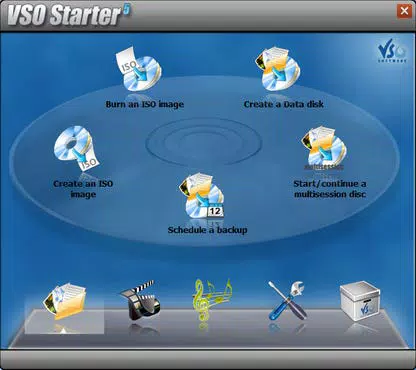
CopyTo presents a clean and minimal interface, prioritizing functionality over visual complexity. The layout is organized around a central task panel, with clear buttons for common actions like “Burn to Disc” and “Create ISO.” Navigation is straightforward, relying on a linear flow that guides users from content selection to finalization. The use of voice notifications enhances accessibility and reduces cognitive load, particularly for less tech-savvy users.
Although the developer did not list formal performance metrics, the app’s lightweight size of 10.4 MB suggests efficient resource usage. It is expected to run smoothly on a variety of Windows devices, from entry-level systems to high-end workstations. Responsiveness is likely to be high, given the single-click operation and absence of heavy graphical elements. Stability appears to be a focus, as the app avoids unnecessary background processes that could interfere with other tasks.
Users can expect consistent performance across different device categories, though specific testing data was not provided. The lack of visible bloat or startup delays indicates a streamlined design. Overall, the user experience is optimized for speed and clarity, aligning with modern expectations for utility software.
Platform Compatibility & Technical Requirements
CopyTo is available exclusively for the Windows platform. It requires Windows operating systems, though specific minimum OS versions were not listed. The application has a file size of 10.4 MB, making it suitable for systems with limited storage space. No additional dependencies or runtime environments were mentioned, suggesting it is a standalone executable.
The developer did not specify minimum hardware requirements or compatibility details beyond the platform. Users should ensure their system supports optical disc drives if they intend to burn to physical media. For those relying on virtual drives or ISO creation, compatibility with standard Windows file systems is assumed. The app’s free price point further increases accessibility across different user segments.
Pros and Cons
Pros
- Lightweight design at just 10.4 MB
- Free to download and use
- Single-click burning for quick execution
- Supports multiple media types: video, music, data, games, photos
- Smart data analyzer for format optimization
- Voice notifications for improved user guidance
- Advanced options for power users (Unicode, multi-burn, ISO editing)
Cons
- Platform limited to Windows only
- Specific OS version requirements not disclosed
- No information on update frequency or support channels
- Compatibility with non-standard or older disc formats not confirmed
- Integration with cloud services or external drives not mentioned
FAQ
Is CopyTo safe to download and install?
Yes, CopyTo is a free utility developed by VSO Software. It does not include malware or intrusive ads, and its file size suggests it is a lightweight, standalone application.
Can I burn to USB drives using CopyTo?
The provided information does not confirm USB burning capabilities. The app is primarily designed for optical media like DVDs, CDs, and Blu-ray discs. Support for USB devices was not specified.
Does CopyTo support burning Blu-ray discs?
Yes, CopyTo supports burning to Blu-ray discs, as noted in its feature list. The app can analyze content and recommend Blu-ray format when appropriate.
How often is CopyTo updated?
The developer did not disclose update frequency. Users are advised to check the official source for the latest version, especially for security and compatibility improvements.
Is CopyTo compatible with Windows 10 and Windows 11?
While not explicitly confirmed, the app’s compatibility with modern Windows systems is likely, given its lightweight design and release date in 2024. However, specific OS requirements were not listed.
Final Thoughts
CopyTo stands out as a focused, efficient utility for users seeking a reliable way to burn digital content to physical media. Its combination of speed, simplicity, and advanced features makes it suitable for both beginners and experienced users. The inclusion of voice feedback, smart format suggestions, and multi-burn support adds significant value without complicating the core experience. For those who frequently create DVDs, backup data, or distribute media, CopyTo offers a streamlined, no-cost solution that delivers on its promise of ease and performance.
While it is limited to Windows and lacks detailed technical disclosures, its lightweight footprint and free availability make it a compelling choice. Whether you're preserving memories, sharing files, or preparing content for playback, CopyTo delivers a consistent and user-friendly experience.
Download CopyTo now


